BTCPay Server
BTCPay Server is a free, open‑source, self‑hosted Bitcoin payment processor that allows businesses and individuals to accept Bitcoin and, optionally, Lightning payments directly into their own wallets, without intermediaries, KYC gateways, or processing fees. By giving merchants full control over their payment infrastructure and funds, it reduces reliance on custodial processors and demonstrates Bitcoin’s core properties of censorship resistance, privacy, and self‑sovereignty in real‑world commerce, which strengthens user trust and practical usability.
Hosted vs Self-Hosted
At payinbtc.me, we offer BTCPay Server hosting tailored specifically for our services, providing a convenient option if you prefer not to self-host. While BTCPay Server can be self-hosted by anyone with an always-on server and the technical ability to set it up, our hosted solution removes the complexity and ensures reliability. For more advanced needs, you can also reach out to our partner, Lightning Checkout, which provides hosted BTCPay Server instances along with additional e-commerce integrations and a full-featured point-of-sale terminal. This way, you have flexible options to accept Bitcoin payments seamlessly.
Get Store ID and API key to connect to payinbtc
Retrieve Store ID
- Go to your BTCPay instance and login
- You will now see the Store ID
- Copy it and paste it somewhere you can find it later
Generate API keys for payinbtc.me
- Go to your BTCPay instance and login.
- Navigate to Account → Manage Account → API Keys (or directly via: /account/apikeys ).
- Click Generate API Key.
- Enter a label (name) for the API Key.
- Select these specific permissions:
- Create Invoices to generate invoices.
- View Invoices to retrieve status updates.
- For each permission, select only the relevant store to apply the least possible permissions.
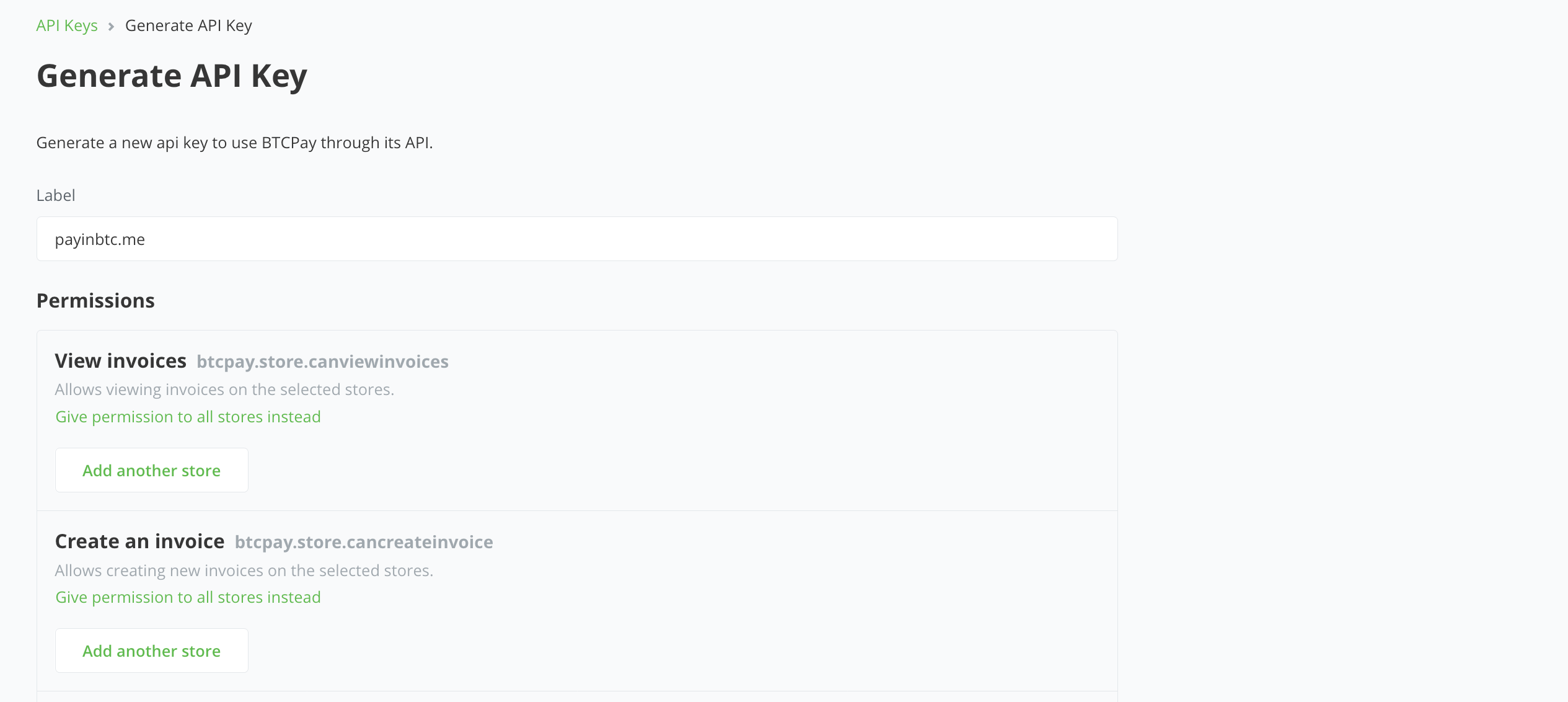
- Click on the button Generate API Key
- The key is now generated. Look it up in the list and press Reveal
- Click the copy icon to copy the API key and paste it somewhere you can find it later
During the setup you will need to enter the BTCPay host url of your instance and the Store ID and API Key.
Start accepting bitcoin with BTCPay Server
BTCPay Server works with every accounting platform we support. See all combinations and pricing on our integrations page at payinbtc.me.